Add columns to an existing grid
Sooner or later someone asks for “just one more column” on a base grid, such as the PO total on the Purchase Order Entry landing page or a UD field on a tracker grid. If the field is already in the grid’s data view, you just add the column. When it isn’t, the cleanest fix is usually on the server: add the value to the rows the grid already receives, then add a column for it.
Choosing an approach
Section titled “Choosing an approach”| Approach | When it fits | Downsides |
|---|---|---|
| Add a column for a field already in the data | The field is in the view (check with Ctrl+Alt+V) | None, so check this first |
| Replace the grid with a BAQ grid | You need lots of extra fields, or a different shape of data | The new grid doesn’t interact with the rest of the screen the way the base grid does |
| Fill the value client-side with events | Server changes aren’t an option | Fragile: depends on the right events firing at the right time |
| Post-processing BPM (this page) | You need one or a few extra values per row | Needs BPM access, and runs on every call to that method |
The BPM approach leaves the base grid and all its behavior intact. The rows simply arrive with extra columns.
What it does
Section titled “What it does”A post-processing method directive runs after the business object method that fills the grid. It looks up the extra values and adds them to each result row under a new column name. Kinetic passes those extra columns through to the browser, where a grid column can bind to them like any other field.
Where it runs
Section titled “Where it runs”A post-processing method directive on the method that populates the grid. See the BPM overview for creating directives.
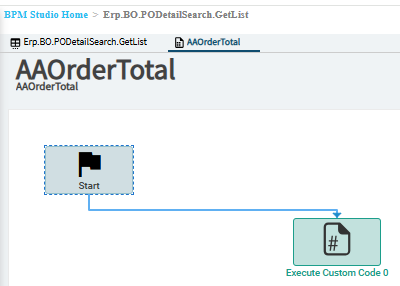
To find the method:
- Open the screen with the browser’s developer tools on the Network tab.
- Load the grid (open the landing page, search, or select the record).
- Find the request that returned the grid’s rows. Its URL names the service and method, for example
Erp.BO.PODetailSearchSvc/GetListfor the PO landing page. The response shows the result table’s name and the key fields on each row.
Example
Section titled “Example”Add each PO’s total order value to a landing grid whose rows carry PONum:
// Post-processing on the method that fills the grid.// "ResultTable" is a placeholder: use the table name from the method's result.var rows = result.ResultTable;
if (rows.Any()){    // One query for all rows, not one per row.    var poNums = rows.Select(r => r.PONum).Distinct().ToList();
    var totals = Db.POHeader        .Where(h => h.Company == Session.CompanyID && poNums.Contains(h.PONum))        .Select(h => new { h.PONum, h.DocTotalOrder })        .ToList()        .ToDictionary(h => h.PONum, h => h.DocTotalOrder);
    foreach (var row in rows)    {        if (totals.TryGetValue(row.PONum, out var total))        {            // New column name. The grid column's Field must match it exactly.            row["XX_POTotal"] = total;        }    }}
Then, in Application Studio on the screen with the grid:
-
Select the grid and open Data > Grid Model > Columns.
-
Click + and set Field to
XX_POTotaland Title toPO Total.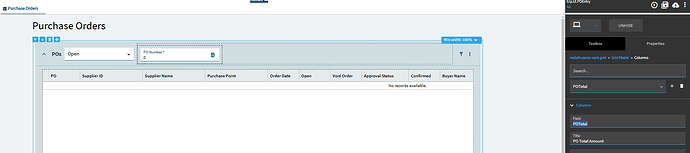
-
Save, publish and test.
How it works
Section titled “How it works”row["XX_POTotal"] = …adds a column that isn’t part of the table’s schema. The value travels with the row to the client and appears in the grid’s data view under that name.- Collecting the keys first and running a single query keeps the directive fast. The landing page may return hundreds of rows, and a query per row adds up.
- The column name is yours to choose. Stick to letters, digits and underscores, and use your prefix so it can’t clash with a future Epicor field.
Variations
Section titled “Variations”- Several fields: select more columns in the query and set several
row[...]values in the loop. - UD fields: read the UD column (
Character01, or an_cfield) from its table the same way. - Detail grids: the same approach works on
GetRows-style tracker methods. Find the method in the Network tab the same way.
Sources
This page is written in our own words. It was informed by: