Deleting jobs, audit logs and locked labor
Three Job Entry tasks that come up often and aren’t obvious from the screen: removing a job, seeing who changed it, and clearing labor that’s stuck in a closed period.
Deleting a job
Section titled “Deleting a job”In Kinetic Job Entry, open the job and use the Overflow menu (the three dots) on the job Details page or the Activity page. Choose Delete Job.
If you’re on the Assemblies page, the same menu position offers Delete Subassembly instead, which removes only the selected assembly. Go back to Details to delete the whole job.
A job can’t be deleted once it has activity that needs to stay on record. Common blockers:
| Blocker | What to do |
|---|---|
| Labor or material transactions posted | You can’t delete it. Complete and close the job instead |
| An open material queue request (Advanced Material Management) | Process or delete the request in Material Request Queue first |
The job change audit log
Section titled “The job change audit log”Epicor can log changes made to engineered jobs.
- In Company Configuration, go to Modules > Production > Job.
- Select Prevent Changes. This locks engineered jobs so their method can’t be edited without first clearing Engineered.
- Select Create Audit Log, which becomes available once Prevent Changes is on.
- Save.
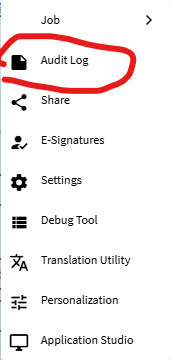
From then on, when someone clears Engineered and changes a job, Epicor asks for a change description and records it. To read the log, open the job in Job Entry or Job Tracker and pick Audit Log from the Overflow menu.
“Labor record not approved” and clock-out failures
Section titled ““Labor record not approved” and clock-out failures”Symptom: an employee can’t clock out, or labor entry refuses to save, and the message points at a labor record that isn’t approved.
Cause: an older labor transaction was never approved (or never completed) and the period it belongs to has since been closed and locked. Epicor can’t finish processing the employee’s activity because it touches a record it’s no longer allowed to change. Locked transactions can’t be unlocked one at a time; the only way to reopen them is to reverse the period close, which is rarely practical for anything but the most recent period.
Fix:
- Find the stuck record in Time Entry or a BAQ over
LaborHed/LaborDtlfor the employee, looking for an old row that isn’t approved. - If possible, complete and close the job the record belongs to, so nothing else needs to post against it, then clock the employee out again.
- If the job can’t be completed, ask Epicor Support for a data fix for the specific labor record.
Prevention: review unapproved and open labor before each period close (a simple BAQ on LaborDtl
with TimeStatus not approved and a payroll date in the period works well), and don’t close a period
while activity is still open.