Build a function
This page takes you from an empty library to a working function: adding the function, defining its signature, giving the library the references the code needs, and the handful of objects you’ll use in almost every custom code function.
Before you start
Section titled “Before you start”- You need the Functions Power Developer security group to write C#. A Functions Developer can build Widget Functions only.
- The library must allow the kind of function you’re adding (Custom Code Functions or Custom
Code Widgets), and DB Access from Code must be
Read OnlyorRead Writeif your code usesDb. See Libraries, publishing and security.
- Open the library in Epicor Functions Maintenance. It must be unpublished.
- Choose New > Add Custom Code Function (or Add Widget Function / Add Widget Function with Code).
- Enter a Function ID and a Description that says what the function returns, not how.
- On Signature, click Edit and add request and response parameters (below), then click Complete.
- Tick Requires Transaction if the function updates data.
- Click Edit (code function) or Design (widget function) and write the logic.
- Save. Fix anything listed in the error list; a function can be saved while Disabled if you need to park it with compile errors.
The signature
Section titled “The signature”The signature is the function’s contract with its callers.
- Request parameters are inputs. In code you read them by name (
orderNum, orthis.orderNum). - Response parameters are outputs. You assign them by name, and whatever they hold when the code finishes is returned.
Types can be simple (System.String, System.Int32, System.Decimal, System.Boolean,
System.DateTime), a System.Data.DataSet, or a tableset type from a referenced assembly, for
example Erp.Tablesets.SalesOrderTableset.
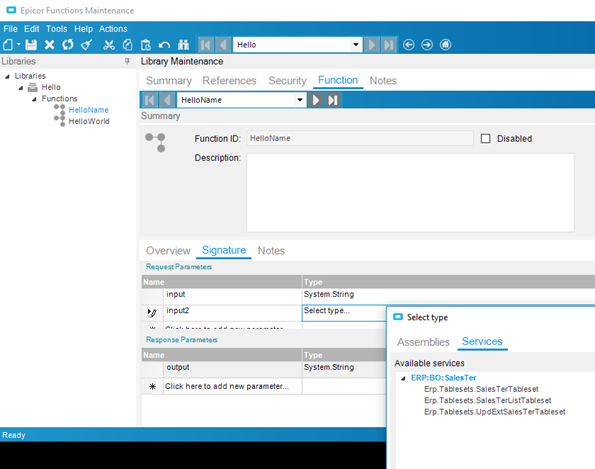
Design signatures for the caller:
- Prefer a few simple parameters over one big tableset when the caller is a screen or an external system. They’re easier to fill in from Application Studio and from JSON.
- Return something the caller can act on: a success flag plus a message is often more useful than throwing an error for an expected situation such as “nothing to do”.
- Name parameters consistently (
orderNum, notOrderNumin one function andordNumin another). Over REST, JSON property names must match exactly.
References: what your code can see
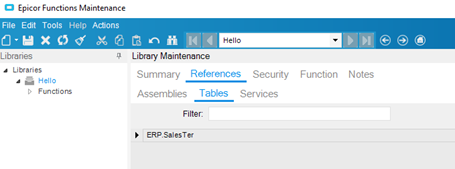
Section titled “References: what your code can see”A function can only use what its library references. If the code editor doesn’t recognise a service or table, the reference is usually what’s missing.
| Your code uses | Add under References |
|---|---|
Db.Customer |
Tables: ERP.Customer (tick Updatable only if you write to it) |
CallService<Erp.Contracts.SalesOrderSvcContract> |
Services: the SalesOrder business object |
| A tableset type in the signature or a variable | Assemblies: the service’s contract assembly, e.g. Erp.Contracts.BO.SalesOrder.dll |
CallService<Ice.Contracts.DynamicQuerySvcContract> to run a BAQ |
Services: the DynamicQuery business object |
| A function in another library | Libraries: that library |
A first custom code function
Section titled “A first custom code function”This function returns the total on-hand quantity for a part across all warehouses.
- Request:
partNum(System.String) - Response:
onHand(System.Decimal),message(System.String) - References: table
ERP.PartWhse(read-only)
if (string.IsNullOrWhiteSpace(partNum)){    message = "No part number was supplied.";    return;}
onHand = Db.PartWhse    .Where(w => w.Company == Session.CompanyID && w.PartNum == partNum)    .Sum(w => (decimal?)w.OnHandQty) ?? 0m;
message = $"{partNum}: {onHand} on hand.";
return ends the function early; the response parameters keep whatever you’ve assigned so far.
The objects you’ll use most
Section titled “The objects you’ll use most”| Object | Use |
|---|---|
Db |
The database context. Query referenced tables with LINQ, exactly as in BPM code. See Query the database with LINQ. |
this.CallService<TContract>(svc => { … }) |
Get a business object, use it inside the lambda, and have it disposed for you. |
Ice.Assemblies.ServiceRenderer.GetService<TContract>(Db) |
The alternative way to get a service; wrap it in using. |
Session.CompanyID, Session.UserID |
The company and user the function is running as. |
callContextClient.CurrentCompany, callContextClient.CurrentUserId |
The same information from the calling client’s context. |
callContextBpmData |
The BPM data fields (Character01, Checkbox01…) shared with the caller, when called from a directive. |
this.ThisLib / this.EfxLib |
Call other functions. See Call a function. |
Always filter queries by company. A function called by an integration or a schedule is still running in one company, and forgetting the filter reads every company’s data.
Messages and errors
Section titled “Messages and errors”To stop with an error that the caller sees (a screen shows it; REST returns it as a 400 response), throw a business-logic exception:
if (order == null) throw new Ice.BLException($"Order {orderNum} was not found.");With Requires Transaction ticked, the exception also rolls back any updates the function made.
For an informational message rather than an error, use PublishInfoMessage:
this.PublishInfoMessage( "Nothing to consolidate on this order.", Ice.Common.BusinessObjectMessageType.Information, Ice.Bpm.InfoMessageDisplayMode.Individual, "", "");Info messages only reach a person when the function was called from an interactive session. When the caller is REST or a schedule, return the text in a response parameter instead.
Widget functions
Section titled “Widget functions”The Function Designer is the same canvas as the BPM designer: start from Start and connect widgets such as Condition, Set Argument/Variable, Fill Table by Query, Invoke BO Method, Invoke Function and Send E-mail. Response parameters are set with Set Argument/Variable.
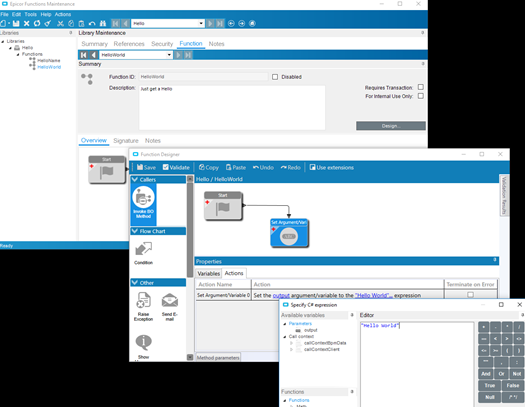
Query widgets can only see tables in the library’s references, whatever the DB Access from Code setting.