Messages and exceptions
A directive talks to the user in two ways: an information message, which lets the call carry on, and an exception, which stops it. This page covers both, in widgets and in code, and how to use messages while you’re building a directive.
Information messages
Section titled “Information messages”Use an information message when the user should know something but the save should still go ahead: “this order has been put on hold”, “the default warehouse was applied”.
Widget: add a Show Message widget and type the text. You can insert field values into the text from the tableset.
Code: BPM code runs on the server, so there’s no MessageBox.Show. Publish a message instead and
the client displays it when the call returns:
this.PublishInfoMessage( "Order 10001 has been put on hold.", Ice.Common.BusinessObjectMessageType.Information, Ice.Bpm.InfoMessageDisplayMode.Individual, "", // optional: name of the related table or context ""); // optional: name of the related field or contextRecent versions also accept the shorter InfoMessage.Publish("...").
InfoMessageDisplayMode.Individual shows each message on its own. If your code publishes one message
per row, consider building one combined message instead so the user isn’t clicking through a stack of
pop-ups.
Exceptions: stopping the save
Section titled “Exceptions: stopping the save”An exception cancels the call. The user sees the message and nothing is saved. Raise it from pre-processing or an In-Transaction data directive, before anything has been written.
Widget: connect a Raise Exception widget to the True exit of your condition and enter the message.
Code: throw a business logic exception.
throw new Ice.BLException("Unit price can't be zero.");If you need to set the message type explicitly, the longer form is:
throw new Ice.Common.BusinessObjectException( new Ice.Common.BusinessObjectMessage("Unit price can't be zero.") { Type = Ice.Common.BusinessObjectMessageType.Error });Pattern: report every problem at once
Section titled “Pattern: report every problem at once”If several rows can be wrong, collect them all and throw once. Users fix everything in one pass instead of one error per save.
This In-Transaction data directive on the OrderDtl table stops any order line being saved with a
zero unit price:
var problems = new List<string>();
foreach (var line in ttOrderDtl.Where(r =>    r.RowMod == IceRow.ROWSTATE_ADDED || r.RowMod == IceRow.ROWSTATE_UPDATED)){    if (line.UnitPrice == 0)        problems.Add($"Order {line.OrderNum}, line {line.OrderLine}");}
if (problems.Count > 0){    throw new Ice.BLException(        "These order lines have a unit price of zero:" + Environment.NewLine +        string.Join(Environment.NewLine, problems) + Environment.NewLine + Environment.NewLine +        "(Directive: XX_BlockZeroPriceLines)");}
Because it’s a data directive, it applies to lines saved from Order Entry, from quote conversion, from DMT and from any integration.
Write messages people can act on
Section titled “Write messages people can act on”- Say what’s wrong and what to do about it: “Enter a PO number in the notes before ending this activity”, not “Invalid entry”.
- List the specific records (order, line, operation) that failed.
- Add the directive name at the end. When a user sends a screenshot to support, whoever maintains the BPMs can find the right directive immediately.
Gotcha: checking that several values match
Section titled “Gotcha: checking that several values match”When you validate that a set of values all agree (say, an order, line and release typed by a user
against the ones on a record), any single difference is a mismatch. Join the tests with ||:
bool mismatch = typedOrder != row.OrderNum || typedLine != row.OrderLine || typedRelease != row.OrderRelNum;Joining them with && only flags a mismatch when every value differs, so most bad entries slip
through.
Debugging with messages
Section titled “Debugging with messages”There’s no step-through debugger for BPM code, so messages are the usual way to see what’s happening.
- Publish an information message with the values you want to inspect: row counts,
RowMod, key fields, results of a lookup. Messages don’t stop the call, so you can see several in one test. - Avoid debugging with unconditional
throwstatements. Every save of that screen fails while the line is there, and any code after thethrownever runs, so you can’t test the logic beyond it. - Remove debug messages before you enable the directive for real users, or put them behind a condition that only matches your test user.
- Test in a non-production company or environment first.
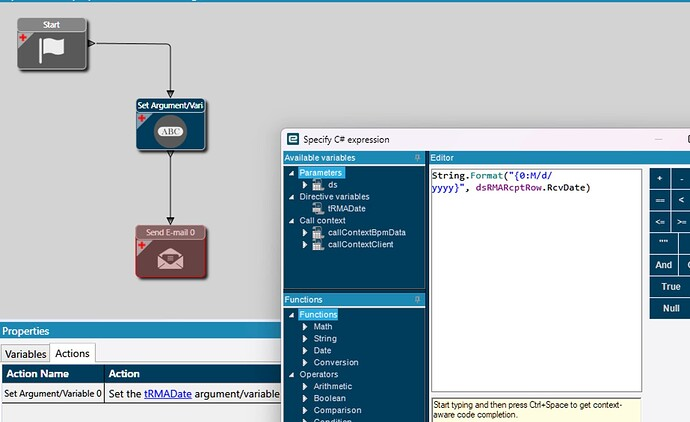
To show a date without the time part, format it explicitly. Date fields in tablesets are usually
nullable, so allow for no value. For example, with an OrderHed row in header:
string shown = header.RequestDate.HasValue ? header.RequestDate.Value.ToString("M/d/yyyy") : "(no date)";string.Format("{0:M/d/yyyy}", header.RequestDate) also works and returns an empty string for a null
date.
Related
Section titled “Related”- BPM conditions decides when your message or exception fires.
- Common BPM problems covers messages that appear twice.