Filter and extend list results
Directives aren’t only for saves. Retrieval methods such as GetList, GetRows and screen-specific
“get” methods are ordinary business object methods too. A pre-processing directive can change what
they fetch, and a post-processing directive can change what they return. That gives you two handy
techniques: filtering lists, and adding columns to them.
Filter a list with whereClause
Section titled “Filter a list with whereClause”Most GetList methods take a whereClause parameter, a SQL-style filter the client builds.
Drop-downs and search screens call GetList to fill themselves, so changing the filter in
pre-processing changes every list that uses the method.
Example: hide retired ship-via codes. Suppose retired codes have descriptions starting with ZZ.
- Create a pre-processing directive on
Erp.BO.ShipVia.GetList. - Add a Set Argument/Variable widget: set the
whereClauseargument to this expression:
"Description not like 'ZZ%'" + (string.IsNullOrWhiteSpace(whereClause) ? "" : " and " + whereClause)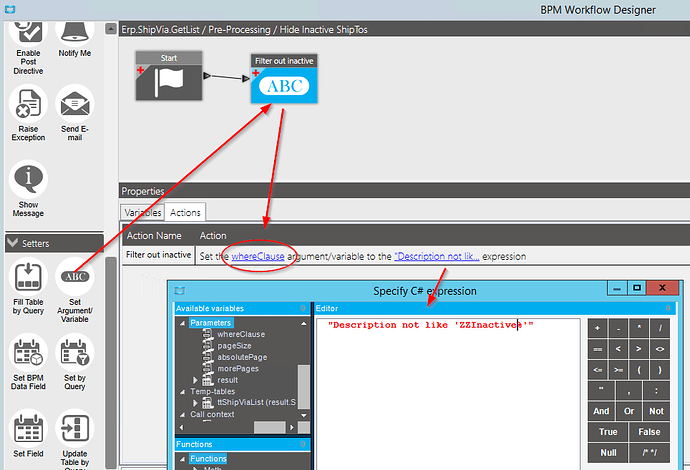
Putting your filter first and keeping the client’s clause after it preserves any filter the screen was already asking for.
Things to know:
- Existing records that already use a hidden code are unaffected; the code just stops being offered.
- If the table has a real inactive flag, or you add a UD one, filter on that instead of a naming convention.
- Not every drop-down uses
GetList. Some useGetRowsor a BAQ. Trace the screen to confirm (see Find the method a screen calls).
Add a column to returned rows
Section titled “Add a column to returned rows”In post-processing, the returned tableset is in result (or ds for methods that fill their
tableset parameter). You can set extra values on each row by name, and they travel back to the client
with the row:
row["ProductGroup"] = "PG-01";The client can then show that value, for example as an extra grid column added in Application Studio.
Example: show each job’s product group in the job list
Section titled “Example: show each job’s product group in the job list”Post-processing on the job list method (Erp.BO.JobEntry.GetList), adding the part’s product group to
every returned row:
var rows = result.JobHeadList    .Where(r => !string.IsNullOrEmpty(r.PartNum))    .ToList();
var partNums = rows.Select(r => r.PartNum).Distinct().ToList();
var prodCodeByPart = Db.Part    .Where(p => p.Company == Session.CompanyID && partNums.Contains(p.PartNum))    .Select(p => new { p.PartNum, p.ProdCode })    .ToDictionary(p => p.PartNum, p => p.ProdCode);
foreach (var row in rows){    string prodCode;    row["ProductGroup"] = prodCodeByPart.TryGetValue(row.PartNum, out prodCode) ? prodCode : "";}
Why a dictionary
Section titled “Why a dictionary”The obvious version runs Db.Part.Where(...).FirstOrDefault() inside the loop. That’s one database
round trip per row, and list methods can return hundreds of rows, so the screen slows down noticeably.
Loading everything you need in one query, then looking up in memory, keeps it to a single round trip.
Only load the keys that are actually in the result. A dictionary built from a whole table (every job in the company, say) is fast on a test system and slow in production.
Values that don’t need the database
Section titled “Values that don’t need the database”Sometimes the new column is just arithmetic on data already in the result, such as quantity times unit cost for a subtotal column. No query is needed; loop over the rows and set the value. If the result has several related tables, group the child rows by their key once, rather than filtering the child table again for every parent row.
Where this works
Section titled “Where this works”The same technique applies to any method that returns rows to a screen: GetList, GetRows,
GetByID, and screen-specific retrieval or “process” methods that return a result tableset. Trace the
screen, find the method whose response contains the rows you want to extend, and put a post-processing
directive on it.
Related
Section titled “Related”- Query the database with LINQ
- Fix “There is already an open DataReader”, a common error when looping over results while querying