Libraries, publishing and security
Every function belongs to a library, and most of the decisions that affect whether a function can be edited, what it’s allowed to touch and who can call it are made on the library. This page walks through those settings in the order you’ll meet them.
Security groups
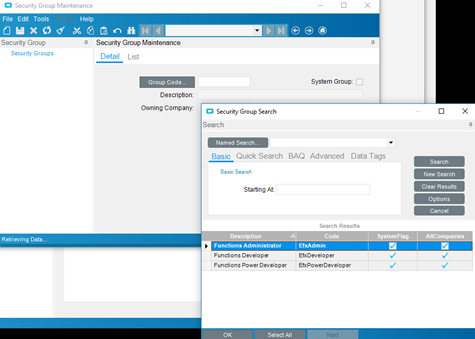
Section titled “Security groups”Epicor Functions doesn’t use check boxes on the user account. Access comes from three system security groups that you add users to in Security Group Maintenance (or on the user’s security groups):
| Group | Code | Can do |
|---|---|---|
| Functions Administrator | EfxAdmin |
Promote and demote libraries, enable or disable them, map them to companies, change owners, export and import any library. Can’t edit function logic. |
| Functions Developer | EfxDeveloper |
Create libraries and Widget Functions, and edit libraries they own or that are shared with them. Can’t write C#. |
| Functions Power Developer | EfxPowerDeveloper |
Everything a Developer can do, plus turn on custom code, write Custom Code Functions and code widgets, and allow database access from code. |
The split is deliberate: whoever builds a function isn’t automatically the person who releases it to production. On a small team one person often holds both roles, but keep the separation in mind if auditors ask who can change live logic.
Creating a library
Section titled “Creating a library”In Epicor Functions Maintenance, type a new ID in the Library field and confirm that you want to add it. Library and function IDs follow the same rules:
- 1 to 30 characters: letters, digits and dashes only
- must start with a letter and can’t end with a dash
- can’t be exactly a C# keyword (
Classis rejected,MyClassis fine) - can’t be changed once saved
If a function ID contains a dash, C# callers write it with an underscore (calc-total becomes
calc_total). Avoiding dashes saves confusion.
Library options
Section titled “Library options”| Option | What it does |
|---|---|
| Custom Code Widgets | Allows Execute Custom Code and custom-code conditions in the Function Designer. Power Developers only. |
| Custom Code Functions | Allows pure C# functions in the library. Power Developers only. |
| DB Access from Code | None, Read Only or Read Write. Controls whether C# code and expressions may use Db to query or update the tables listed in the library’s references. Power Developers only. |
| For Internal Use Only | Hides every function in the library from REST. Internal functions can only be called from BPM directives. |
| Disabled | Turns off every function in the library. Callers can still see it, but calls fail. |
| Debug Mode | Compiles the library unoptimized, with debugging symbols, and dumps its source. Use while developing. |
| Dump Sources | Saves the generated C# source on compile, for debugging on the server. |
Each function also has its own For Internal Use Only and Disabled flags, plus Requires Transaction, which wraps the whole function in a database transaction so that a failure rolls back every update it made. Tick it on any function that updates more than one record.
Epicor’s own guidance is to use direct database writes only for user-defined (UD) tables and fields, and to go through business objects for everything else. See Call business objects from a function.
References
Section titled “References”A library opts in to what its functions may use. On the References card you add:
- Assemblies: contract assemblies such as
Erp.Contracts.BO.SalesOrder.dll, needed when a function’s signature or variables use that service’s tableset types. - Tables: database tables such as
ERP.CustomerorICE.UD01, for query widgets and forDbaccess in code. - Services: business objects (
BO), simple services (Lib), reports (Rpt) and processes (Proc) the functions will call. - Libraries: other function libraries whose functions you want to invoke. Circular references aren’t allowed.
Keeping references to what the library really uses makes it faster to compile and easier to upgrade. Build a function covers references from the code side.
Ownership and sharing
Section titled “Ownership and sharing”A library has an owner (the user who created it, unless changed) and an owning company. On the Security card you can pick a Share With Group: members of that security group can edit the library as if they owned it. Ownership and sharing can only be changed while the library is unpublished.
A library opens read-only if any of these is true:
- you aren’t the owner and aren’t in its Share With Group
- it was created in a different company from the one you’re logged into
- it’s published
Company mapping
Section titled “Company mapping”The Security card’s Authorized Companies list controls where the library can be called from.
- An unpublished library can be called from its owning company without any mapping.
- A published library must be mapped explicitly to every company that calls it, including its
own owning company. A REST call from an unmapped company returns
404 Not Found.
Forgetting to map the owning company after promoting a library is one of the most common reasons a function “disappears” the moment it goes live.
Promoting and demoting
Section titled “Promoting and demoting”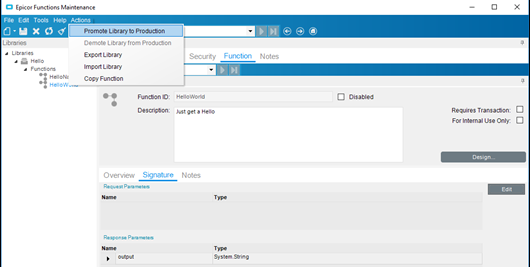
Actions > Promote Library to Production publishes the library. Only a Functions Administrator can do it. Once published:
- the library and its functions become read-only, even to the owner
- an administrator can still enable or disable it, change its company mapping, or demote it
- published functions appear in the REST help and can be called through the normal REST URL
Actions > Demote Library from Production takes it back to development. While it’s demoted, normal
callers can’t reach it; developers can still test it over REST through the staging URL (see
Call a function).
The point of this workflow is to protect the function’s contract. Once other screens, directives or integrations call a published function, changing its signature can break them. Demote, change, test and promote again, and treat signature changes like any other breaking API change.
Restricting REST callers with access scopes
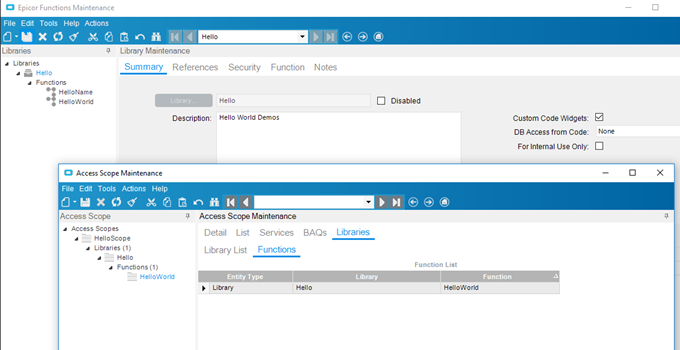
Section titled “Restricting REST callers with access scopes”On top of For Internal Use Only, an Access Scope can list specific libraries and functions. When an API key is tied to that access scope, the key can call only what the scope allows. See Authentication, API keys and integration accounts.
Moving libraries between environments
Section titled “Moving libraries between environments”Actions > Export Library saves the library to a file, either binary (.efxb) or plain JSON
(.efxj). Actions > Import Library loads it into another environment.
- Administrators can export and import any library. A published library imported by an administrator stays published.
- Developers can export only unpublished libraries they own or share, and a published library they import arrives unpublished and needs promoting.
- In multi-tenant cloud environments, only Global Security Managers can import libraries that allow code widgets.
Libraries can also be packaged with Solution Workbench, which publishes them as it installs.
Sources
This page is written in our own words. It was informed by: