Common event patterns
These are the event setups that come up again and again. Each one lists the trigger, the widgets and why it’s built that way. The mechanics of triggers and widgets are explained in Events.
React to a value the user types
Section titled “React to a value the user types”Scenario: a field with a search button, where users can also type a value straight in. You want to look something up once a value is entered.
Don’t use the control’s on-blur. It fires whenever focus leaves the field, including when the screen first loads with focus there and the user clicks away before typing. Your event then runs with no value and errors.
Do trigger on the data:
| Setting | Value |
|---|---|
| Type | DataTable |
| Hook | Column Changed |
| Target | The data view the field is bound to, e.g. TransView |
| Columns | The bound column, e.g. XX_CustID |
The event now runs only when the value actually changes, whether it was typed, picked from the search or set by another event. If an empty value is possible, start the chain with a condition such as "{TransView.XX_CustID}" !== "".
React when the user selects a grid row
Section titled “React when the user selects a grid row”Scenario: clicking a row in one grid should update something else: fill fields, refresh a second grid, set a filter.
| Setting | Value |
|---|---|
| Type | DataView |
| Hook | Row Changed |
| Target | The data view the grid is bound to |
When the event runs, the newly selected row is already current, so {XX_OrderGrid.OrderHed_OrderNum} in a row-update or erp-baq gives you the clicked row’s value.
Refresh the screen after a function updates data
Section titled “Refresh the screen after a function updates data”Scenario: an event calls an Epicor Function (or a BAQ update) that changes the record on the server. The work succeeds, but the screen still shows the old values until the user clicks Refresh.
End your chain with event-next and point it at the application’s own refresh event. You get the same result as clicking Refresh, without reloading the browser page or losing the selected record.
The refresh event’s name varies by application. To find it, turn on tracing (Ctrl+Alt+8, see Debugging), click the toolbar Refresh button in the base screen, and note the first event the log shows.
Find a row and make it current
Section titled “Find a row and make it current”Scenario: you’ve remembered a line number (say, in TransView.XX_LineNum) and need to make that line the current OrderDtl row again, for example after a refresh.
Use two widgets:
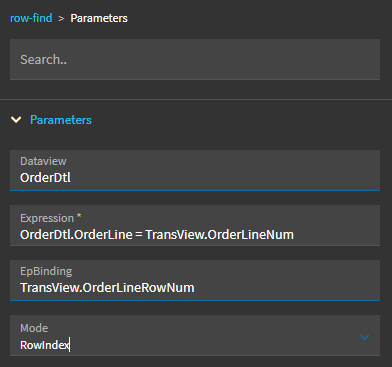
row-findwith:- Dataview:
OrderDtl - Expression:
OrderDtl.OrderLine = TransView.XX_LineNum - EpBinding: where to store the result, e.g.
TransView.XX_LineRowIndex - Mode:
RowIndex
- Dataview:
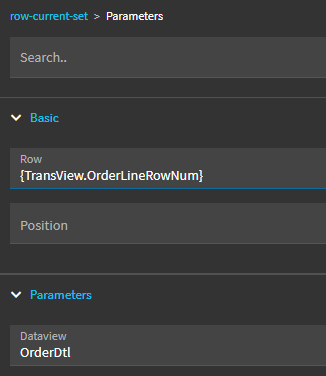
row-current-setwith:- Dataview:
OrderDtl - Row:
{TransView.XX_LineRowIndex}
- Dataview:
Things that trip people up:
- The
row-findexpression uses a single=for comparison, and the working setup references columns as plainView.Columnwith no braces. The JavaScript-style==and===produce an “Errors in criteria parser” error or quietly return the wrong row. RowIndexreturns the row’s zero-based position in the view, not a field value like the line number.-1means no match. That position is exactly whatrow-current-setexpects.- The other modes are
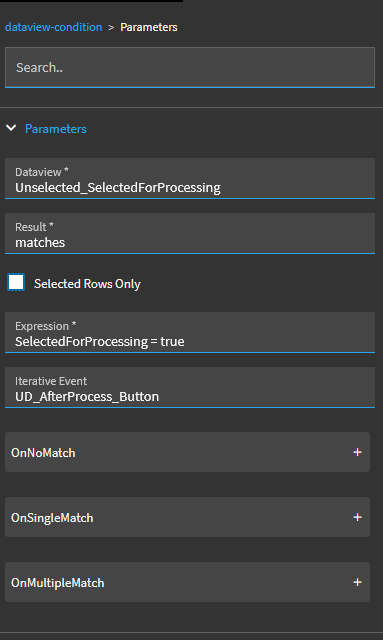
Exists(true/false) andCount(number of matches). dataview-conditionuses the same expression style.
Put the cursor in a field
Section titled “Put the cursor in a field”Use the control-focus-set widget (listed under data view actions in the Toolbox) and point it at the control. The hard part is timing. Hook it to an event that runs after the screen has finished whatever it was doing, such as an After hook on the system event that loads the record, or focus gets taken away again.
Run something when the form loads
Section titled “Run something when the form loads”Hook an After event onto the application’s initialization event (the target is init in many applications), or use the Window load trigger. Use this to set default values in TransView, pre-load a BAQ, or turn on debugging (see Debugging before the form loads).
Load data when the page or record changes
Section titled “Load data when the page or record changes”Hook an After event onto the system event that fires when the context changes (for example the page-change event RowChanging_sysPages), then run your erp-baq or rest-erp call. This is the refresh half of the parent/child pattern in BAQ data views.
Reusable actions
Section titled “Reusable actions”When several triggers need the same steps (a button, a field change and form load all refresh the same BAQ), build the steps once in an event with no trigger. It appears under User Defined Actions. Then call it from each triggering event with event-next. You fix bugs in one place, and the traces read more clearly.
Branch on a value
Section titled “Branch on a value”- Two outcomes:
conditionwith an expression such as"{Part.TypeCode}" === "M", then wire the True and False exits. - Several outcomes:
switchwith Value{Part.TypeCode}and one case per value, each with its own action.
Sources
This page is written in our own words. It was informed by: