BPM overview
Business Process Management (BPM) lets you add your own server-side logic to Epicor without changing Epicor’s code. You attach a directive to a business object method or to a database table. When that method runs or that table is written to, your directive runs as well. It can validate data, set default values, update other records, send email or stop the transaction.
BPMs run on the application server, so they apply however the data arrives: the Kinetic browser client, the Classic smart client, MES, REST calls, DMT imports or another BPM. That makes them the right tool for rules that must always hold.
How Epicor processes a save
Section titled “How Epicor processes a save”Every screen in Epicor talks to a service (also called a business object, or BO), such as
Erp.BO.SalesOrder or Erp.BO.Labor. Each service exposes methods. Opening a record calls something
like GetByID, and clicking Save calls Update (or a wrapper such as MasterUpdate or
UpdateMaster on complex screens). Changing certain fields calls helper methods such as
ChangeShipToID that fill in dependent values.
Each method receives a tableset: an in-memory copy of the records involved, with a RowMod flag on
each row to say whether it was added, updated or deleted. When Update finishes its checks, it writes
those rows to the database tables.
BPM gives you hooks at both levels: around the method call, and around the table write.
Method directives
Section titled “Method directives”A method directive is attached to one business object method, for example Erp.BO.SalesOrder.Update.
It has three possible stages:
| Stage | Runs | Typical uses |
|---|---|---|
| Pre-Processing | Before Epicor’s own method logic | Validate input and throw an error to cancel the call; change values in the incoming tableset; set defaults; record something for post-processing to use |
| Base Processing | Instead of Epicor’s own method logic | Replacing the method completely. Almost never the right choice on a standard method; the normal legitimate use is writing the update logic for an updatable BAQ |
| Post-Processing | After Epicor’s method logic has finished | Read the results; add values to returned rows; create or update other records; send notifications; call other methods or functions |
Data directives
Section titled “Data directives”A data directive is attached to a database table, for example OrderDtl or JobHead, rather than to a
method. It runs whenever rows in that table are saved, regardless of which business object or process
did the saving.
| Type | Runs | Typical uses |
|---|---|---|
| In-Transaction | During the save, before the change is committed | Validate or change the row being written; throw an error to roll the save back |
| Standard | After the save has been committed | Notifications, logging, follow-up updates that should only happen once the data is definitely saved |
Changes you make to the row inside a Standard data directive are not written back: the save has already happened. If you need to change the row itself, use an In-Transaction directive or a pre-processing method directive.
For help choosing between the two families, see Method directives vs data directives.
Where to find them
Section titled “Where to find them”- System Management > Business Process Management > Method Directives
- System Management > Business Process Management > Data Directives
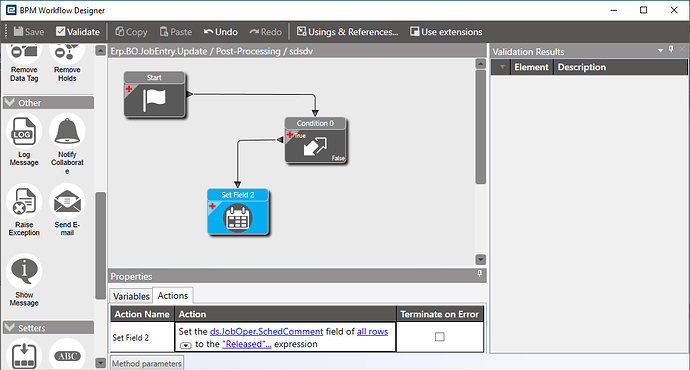
Each directive is built in the BPM designer, a flowchart canvas where you connect widgets (conditions, setters, messages, exceptions, email, BO calls and custom C# code) starting from a Start node. Directives can be grouped with a Group name, and each one must be Enabled to run.
BPM, Epicor Function or Application Studio event?
Section titled “BPM, Epicor Function or Application Studio event?”These three tools overlap. Pick based on where the logic has to run and what triggers it.
| You want to… | Use |
|---|---|
| Enforce a rule every time a record is saved, however it’s saved | BPM (method or data directive) |
| Default or correct values as data flows through a business object | BPM |
| Reuse the same server logic from several directives, screens, REST calls or a schedule | Epicor Function, called from each place |
| Run server logic on demand, for example from a button | Epicor Function, called from the UI |
| Change what the screen does: show or hide fields, set values the user sees before saving, open other screens | Application Studio event (Kinetic) or a customization (Classic) |
A useful rule of thumb: UI events make the screen friendlier, but they don’t protect your data, because DMT, REST and other screens never run them. If a rule matters, enforce it in a BPM and let the UI merely make it easy to follow.
Functions and BPMs work well together. A directive can call a function to keep its own flowchart short, and a function runs in its own context, which avoids compile errors when two services in one directive share tableset types. See Epicor Functions and Call a function.
Pages in this section
Section titled “Pages in this section”Concepts
- Method directives vs data directives: choosing the hook point
- Find the method a screen calls: tracing and field help
- The BPM tableset: ds, tt and RowMod: what data your directive sees
- BPM conditions: making a directive run only when it should
Common patterns
- Messages and exceptions: informing users and blocking bad data
- Pass data from pre- to post-processing
- Query the database with LINQ
- Default and lock field values
- Filter and extend list results
- Update other records from a BPM
- Auto-number customer and supplier IDs
- Run a BAQ from BPM code
- Send email and auto-print from a BPM
- Labor entry BPMs
Troubleshooting