Expressions and JavaScript
Most widget settings in Application Studio accept expressions: the value in a row-update, the test in a condition, a page caption, a website widget URL. They look like JavaScript with some Epicor placeholders mixed in. Knowing how the two combine saves a lot of guesswork.
How an expression is evaluated
Section titled “How an expression is evaluated”Evaluation happens in two steps:
- Placeholders are replaced with text.
{OrderHed.OrderNum}becomes10001and{Customer.Name}becomesAcme Manufacturing, pasted straight into the expression. - The result is evaluated as JavaScript in fields that expect an expression, such as
conditionand therow-updateExpression.
Because step 1 is plain text substitution, you must quote strings yourself:
// Correct: the substituted value becomes a JavaScript string"{Customer.CustID}" === "ACME"
// Wrong: becomes  ACME === "ACME", which fails because ACME isn't a variable{Customer.CustID} === "ACME"
Numbers and booleans don’t need quotes: {OrderDtl.OrderQty} > 100.
You can watch this happen. With tracing on (Ctrl+Alt+8), the console logs each condition twice: once as written, once with the values filled in, followed by what it evaluated to. See Debugging.
Placeholder cheat sheet
Section titled “Placeholder cheat sheet”| Syntax | Where | Means |
|---|---|---|
{View.Column} |
Most widget parameters, captions, URLs | The value of Column on the current row of View |
'??{View.Column}' |
Provider model and BAQ Where clauses | The same value, substituted into a BAQ filter. See BAQ data views |
{actionResult.Field} / actionResult.Field |
Widgets after a service call or search | A value returned by the previous widget, such as a function output parameter or the row picked in a search |
{Constant.CurrentUserID} |
Anywhere | The logged-in user’s ID. Constant holds other session values too |
#_ ... _# |
Anywhere an expression or value is accepted | Run the enclosed JavaScript and use its result |
Running JavaScript with #_ ... _#
Section titled “Running JavaScript with #_ ... _#”Wrap JavaScript in #_ and _# to have Kinetic run it and use the result. This is how you reach things the placeholders can’t: the framework’s trans object, the epDebug helper, or any JavaScript that needs to run in a field that would otherwise be treated as plain text.
#_epDebug.setDebugModeStatus(true)_#turns on debug mode (used in the pre-load debugging event on the Debugging page).
#_trans.dataView('XX_OrderInfo').dataRow(0)['OrderRel_OrderNum']_#reads a column from the first row (index 0) of a data view, whichever row is current. Epicor’s own system events use this pattern. Look for #_trans.dataView(...) in a trace.
Escaping backslashes
Section titled “Escaping backslashes”Expression text goes through one round of unescaping before it runs. In practice, double your backslashes when you need an escape sequence inside a string in an expression:
"{TransView.XX_PastedList}".split("\\n").join("~")Here "\\n" reaches JavaScript as "\n" (a newline). A single backslash may not survive the unescaping round.
Getting a computed date into a date column is the classic trap. A row-update that produces "2024-05-07" works fine into a string column, but a date column may reject it and stay empty, or land on the wrong day.
Fix 1: give the column a full date-time string. Append a midnight time:
new Date(Date.now() - 7 * 24 * 60 * 60 * 1000).toISOString().split("T")[0] + "T00:00:00"That’s “seven days ago, at midnight”, in a format date columns accept.
Fix 2: do it in the BAQ. If the value comes from or goes into a BAQ, add a calculated field in the BAQ designer (for example, use a date-only conversion of a date-time field) and let SQL handle it. Server-side date logic is easier to test and doesn’t depend on the browser.
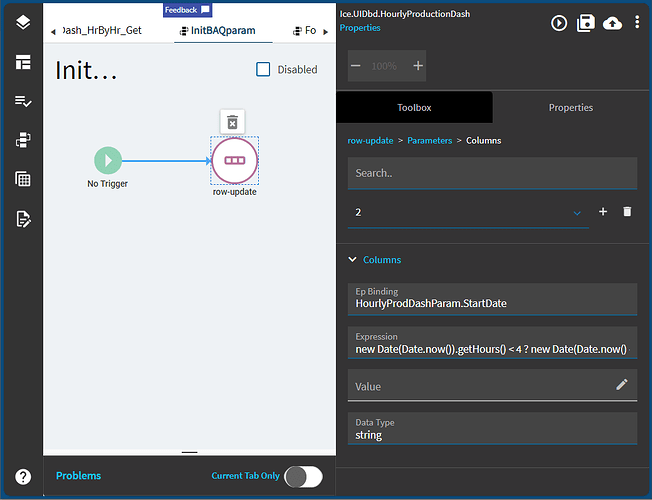
Row-update in detail
Section titled “Row-update in detail”row-update sets one or more columns on the current row of a view. Each entry under Parameters > Columns has:
- Ep Binding: the target
View.Column - Expression: evaluated as described above, or
- Value: a literal value
- Data Type: optional, the type to convert to
Use one row-update with several columns rather than a chain of single-column updates. It keeps the event easier to read.
Sources
This page is written in our own words. It was informed by: