End Activity: the Actions grid and stuck activities
End Activity is where operators report quantity and close out the labor they started. Two questions about it come up regularly: what the mysterious Actions section is, and what to do when an employee is stuck in an activity they can’t end.
The hidden Actions section
Section titled “The hidden Actions section”Open End Activity in Application Studio and you’ll find an Actions panel with a grid (Completed, Sequence, Description, Required, Completed By, Completed On) that never appears when operators use MES.

It’s hidden by a base data rule. Search the Data Rules designer for “action” and you’ll find a rule that sets the actions grid to Invisible when the licensed-modules view says RecipeAuthoring is false:
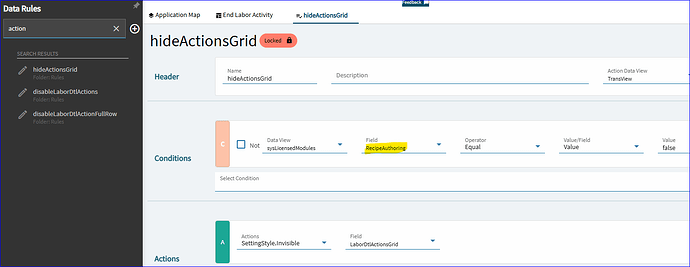
Recipe authoring belongs to Epicor Automation Studio, where automated workflows are called recipes. The grid appears to be where employees would tick off the steps a recipe defines as they end an activity. Without that licence it stays hidden, and there’s nothing to configure.
The takeaway for your own layers: when a base field or panel won’t show, check the base data rules before assuming it’s missing. Data rules covers reading and overriding them.
Ending an activity an employee can’t end
Section titled “Ending an activity an employee can’t end”Now and then an employee ends up in labor they can’t get out of from MES. A typical case: they’re clocked into two operations at once, and the transactions can’t be ended or removed through Time and Expense Entry.
A supervisor can end the activity for them:
- Open End Activity on Active Labor Header (to end the employee’s whole active labor header) or End Activity on Active Labor Detail (to end one activity). Search the menu for “End Activity” if the names differ in your version.
- Enter the employee ID.
- Select the transaction to end.
- Click Process and wait for it to finish.
- Reload to confirm the activity is no longer active, then check the resulting labor in Time and Expense Entry; hours and quantities may need correcting.
These are server processes, so they behave the same whichever client the supervisor uses.
Sources
This page is written in our own words. It was informed by: