Scheduling blocks and split operations
Scheduling blocks let one operation run on several resources at once, cutting its lead time. The concept is simple, but the result depends heavily on whether you schedule finitely or infinitely and on how busy the resources already are. This page explains the setup and the behavior you can expect.
The idea
Section titled “The idea”The engine divides an operation’s production time by its number of scheduling blocks and places each block wherever a resource has room:
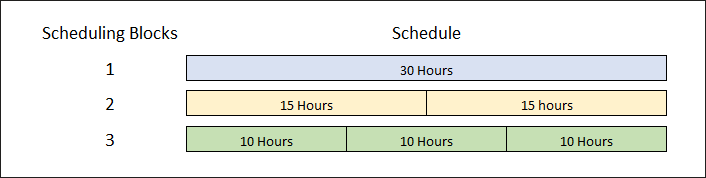
If the blocks land on different resources at the same time, the operation’s elapsed time shrinks. The total hours of work stay the same. Two blocks of 15 hours on two machines in parallel give a 15-hour lead time; the same two blocks back to back on one machine still take 30.
Queue and move time aren’t split. They’re applied once, at the start and end of the operation. Setup, on the other hand, is added in front of each block.
Setting it up
Section titled “Setting it up”- On the resource group, select Split Operations. Without it, an operation’s production time must be placed as one contiguous run. To split only on some resources, clear Use Resource Group Values on those resources and select Split Operations there instead.
- Set Scheduling Blocks on the job operation (or on the part method so jobs inherit it). The value on the resource group is only a default copied to new operations; the engine reads the operation’s value.
- Assign the operation to a resource group (not a single resource) if you want blocks spread across machines.
How it behaves
Section titled “How it behaves”Findings from testing, summarised:
| Scheduling mode | Operation assigned to | Result |
|---|---|---|
| Infinite | Resource group | Blocks always run in parallel. Lead time = production time ÷ blocks |
| Infinite | Single resource | Blocks still run in parallel, on the same resource at the same time. Lead time shrinks even though only one resource exists, which is rarely what you want |
| Finite | Single resource | Blocks run one after another on that resource. No lead-time gain |
| Finite | Resource group | Each block is placed independently in the first free slot. Depending on what’s already loaded, blocks may run in parallel, partly in parallel, or all in sequence |
The finite case is the tricky one. For example, with three 10-hour blocks and a group of three resources where one is already busy, two blocks may start together and the third wait until one of them finishes: 20 hours of elapsed time rather than 10. If a higher-priority job has taken a resource, all blocks may queue on the remaining one and you get no gain at all.
Crew size is not scheduling
Section titled “Crew size is not scheduling”The Crew Size fields on resources and operations multiply labor hours for costing and estimates. They don’t change how the engine schedules the operation. Don’t use crew size to try to shorten lead time.
Modelling a team working one operation together
Section titled “Modelling a team working one operation together”A common need: a station with three people who all work the same job at once, so 30 labor hours should take 10 hours of elapsed time.
- Infinite scheduling: set the operation’s scheduling blocks to the number of people. It works as expected.
- Finite scheduling: give the resource group exactly as many active resources as there are people, and give every operation on that group the same number of scheduling blocks. When everything is aligned, blocks land in parallel.
The weakness of the finite approach is maintenance. If the team shrinks from three to two, you have to change the resource group and the scheduling blocks on every open job operation and method that uses it. A BAQ-driven update or DMT run is the practical way to do that.
Related pages
Section titled “Related pages”Sources
This page is written in our own words. It was informed by: