Operation relationships and send-ahead
By default, each operation waits for the previous one to finish completely. Real shops overlap operations: the first parts off a machine go to deburr while the rest are still being cut. Operation relationships and send-ahead offsets let the schedule overlap operations the same way.
The relationships
Section titled “The relationships”Set on each operation in the method (Engineering Workbench, Job Entry or Quote Entry):
| Relationship | Meaning | Use when |
|---|---|---|
| Finish-to-Start (default) | The next operation starts after this one finishes | Parts move as a single batch |
| Start-to-Start | The next operation can start once this one has started (plus an offset) | Parts flow on in small lots |
| Finish-to-Finish | The next operation finishes shortly after this one finishes | A slower downstream operation must never run out of parts |
With Start-to-Start, the next operation’s queue time is still applied, and the previous operation’s move time can use up part of it. With Finish-to-Finish, the next operation’s queue time is ignored.
Send-ahead
Section titled “Send-ahead”Send-ahead refines Start-to-Start by saying how much of the first operation must be done before the next one begins. You set it in two places:
- On the operation: Send Ahead Type (Hours, Pieces or Percentage) and the Send Ahead Offset value. These default from Operation Maintenance and can be overridden on part, job and quote methods.
- On the site: Scheduling Send Ahead For decides whether the offset delays the next operation’s setup or its production.
For example, with send-ahead of 10 pieces and the site set to Production, production on the second operation starts once the first 10 pieces are expected off the first operation.
When the fast operation finishes first
Section titled “When the fast operation finishes first”Symptom: operation 10 takes 50 hours to make 100 parts. Operation 20 takes 2 hours for the same 100 and is Start-to-Start with a send-ahead of 10 pieces. Epicor schedules all of operation 20 at the start, finishing days before operation 10 has produced most of the parts.
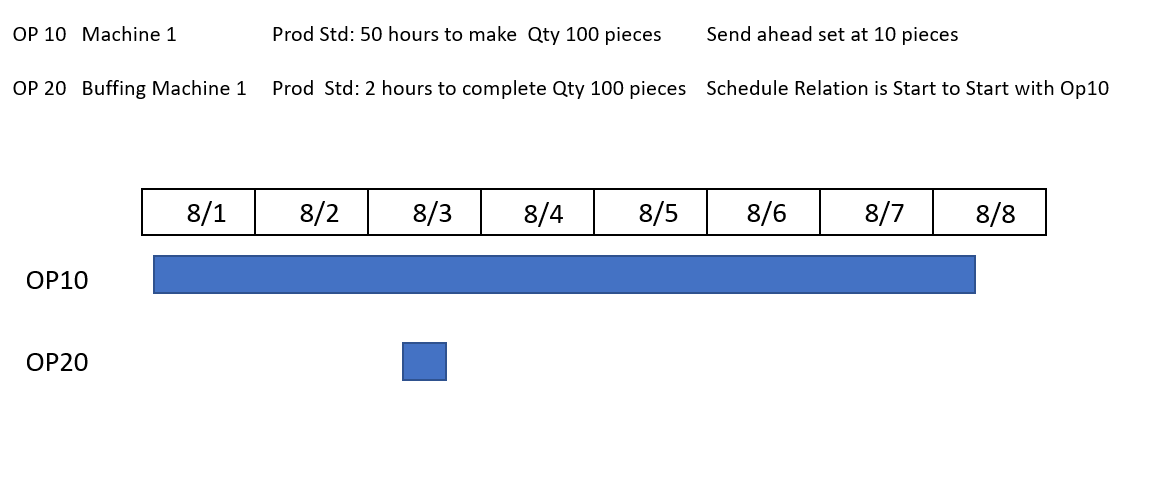
Cause: send-ahead only offsets the start of the next operation. It doesn’t spread the next operation out to match the pace of the one feeding it. After the offset, operation 20 is scheduled as one contiguous two-hour block.
Workarounds:
- Use Finish-to-Finish instead. This is designed for a fast operation fed by a slow one: the downstream operation is placed so it ends just after the upstream one ends, so it’s never shown working on parts that don’t exist yet.
- Add queue time on the downstream resource group so the operation starts later. Remember queue applies to every operation on that group; make a separate group if only some operations need it.
- Accept the start date and ignore the end date for fast downstream operations. The operator will naturally work in bursts as parts arrive; what matters is that the job’s overall end date is right.
Related pages
Section titled “Related pages”Sources
This page is written in our own words. It was informed by: